
How to Pair Spectra Precision Receivers Step by Step Set-Up Guide (HL760 and CR700)
Posted by Kevin Hughes on 20th Feb 2026
Step-By-Step: Pairing Spectra Receivers for Remote in-cab display functionality.
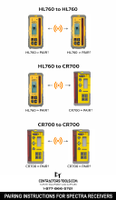
This pairing process applies to HL760 to HL760, HL760 to CR700, and CR700 to CR700 receiver combinations.
1. Turn Both Receivers On
Make sure both units have good batteries.
2. Activate Menu
On the receiver you want to configure:
• Press Menu
• Scroll to RDIO
• Press Enter
3. Select Radio Mode
• Scroll to RDIO HL
• Press Enter
4. Select Pair
• Scroll to PAIR ↑
• Press Enter
Now repeat the same steps on the second receiver.
5. Power Cycle
After pairing:
• Power both receivers off
• Power on the receiver you want to be the main laser receiver first
That unit becomes the primary receiver.
The second receiver will display:
“RMT.D OKAY”
Press Enter to confirm remote display mode.
You will now see a radio symbol on both receivers indicating successful communication.
What “MODE HL” Means
MODE HL sets handheld receiver 2-way communication to operate with another CR700 or HL760.
After pairing:
• Turn the receiver off
• First unit powered becomes main receiver
• Second unit confirms as remote display
What “PAIR ↑” Means
PAIR stores an identification code in memory so the two receivers communicate only with each other.
This prevents cross-communication from other crews working nearby.
Pairing Other Receiver Combinations
This procedure is essentially the same for:
• Pairing two HL760 receivers together
• Pairing two CR700 receivers together
• Pairing an HL760 to a CR700 in either direction
The menu structure and pairing steps remain consistent.
Troubleshooting Tips
If pairing does not complete:
• Confirm serial number compatibility
• Replace batteries in both units
• Restart and repeat pairing steps
• Make sure both units are set to RDIO HL mode
If problems continue, call us — we will walk you through it live.
Need Help?
Contractors-Tools.com
Call 1-877-866-5721
Call or Text 903-733-0335
We work with these units daily and can get you squared away fast.