
How to Set Slope With a Manual Slope Laser: Step by Step
Posted by Contractors-Tools.com on 28th Sep 2026
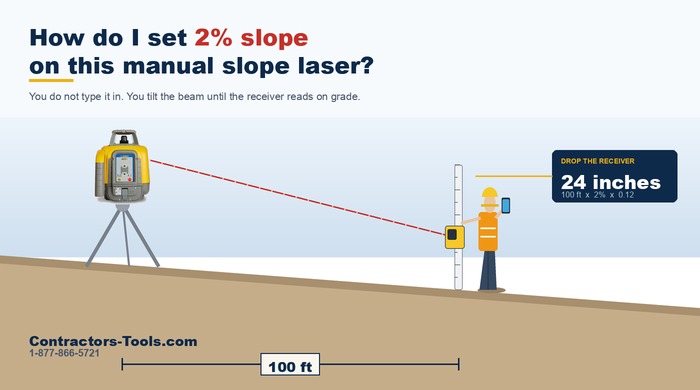
Setting a grade on a manual slope laser is the same job on every machine that does it. Spectra, Topcon, Leica — the buttons are in different places and the lights are different colours, but the method has not changed in thirty years: you work out how far the ground should fall, you move the receiver down the rod by that much, and you tilt the beam until it reads on grade again.
That is it. Four minutes of arithmetic and one walk to the far end. This page is the whole procedure, the chart, and a calculator you can use standing in the dirt.
Automatic (dial-in) slope — you enter 1.5% and the laser holds that grade by itself. That is a grade laser, a different and more expensive machine.
If you try to type a percentage into a manual slope laser, nothing happens — and on some models the screen will tell you it is not supported. Nothing is broken. It was never a feature of that laser.
What You Need
| Kit | Why |
|---|---|
| The laser, on a tripod | It has to be stable. In manual slope nothing re-levels it for you. |
| A receiver on a grade rod | This is how you read the beam. You cannot eyeball a laser outdoors in daylight. |
| A grade rod | Tenths of a foot makes the arithmetic easier. Feet and inches works fine too — see the note further down. |
| Your two elevations | Where the grade starts and where it has to finish, and the distance between them. |
You do not need a remote for most of this — the arrow buttons on the laser itself will tilt the beam on nearly every manual slope machine. A remote or a phone app just saves you walking back.
Setting the Slope, Step by Step
Worked example throughout: a 100 ft driveway that needs to fall 2%.
Our example: 100 × 2 × 0.12 = 24 inches. Two feet over the run.
Down for a fall, up for a rise. Get this the wrong way round and you will double your error rather than cancel it.
Stop when the receiver reads on grade. Your plane now falls at exactly the rate you calculated.
Single Axis Slope, Not Full Manual
Most lasers that do manual slope give you two ways in, and the difference matters more than anything else on this page.
| Mode | Slope axis | Cross axis | What is watching you |
|---|---|---|---|
| Single axis slope | you tilt it | keeps self-leveling | The cross axis. Height-of-instrument alert still works. |
| Full manual | you tilt it | you tilt it | Nothing at all. |
For a driveway, a ramp, a patio or a parking bay, use single axis slope. You give up one axis and the laser keeps watching the other. Your surface still comes out dead level across the fall, and if something knocks the tripod you still get a warning.
Full manual is for the job where both directions have to fall — matching two pairs of existing hubs, say. It is a real capability and sometimes you need it. But know what you are giving up:
You find out when the concrete is wrong. If you must work in full manual, re-shoot your benchmark regularly — every time you move the rod is not too often.
How Far to Drop the Receiver
Slope chart
Move the receiver down the rod by this much:
| SLOPE | 25 ft | 50 ft | 75 ft | 100 ft | 150 ft | 200 ft | 300 ft |
|---|---|---|---|---|---|---|---|
| 0.5% | 1.5″ | 3″ | 4.5″ | 6″ | 9″ | 12″ | 18″ |
| 1% | 3″ | 6″ | 9″ | 12″ | 18″ | 24″ | 36″ |
| 1.5% | 4.5″ | 9″ | 13.5″ | 18″ | 27″ | 36″ | 54″ |
| 2% | 6″ | 12″ | 18″ | 24″ | 36″ | 48″ | 72″ |
| 2.5% | 7.5″ | 15″ | 22.5″ | 30″ | 45″ | 60″ | 90″ |
| 3% | 9″ | 18″ | 27″ | 36″ | 54″ | 72″ | 108″ |
| 4% | 12″ | 24″ | 36″ | 48″ | 72″ | 96″ | 144″ |
| 5% | 15″ | 30″ | 45″ | 60″ | 90″ | 120″ | 180″ |
Or put your own numbers in
Works on this page with no signal. The chart above is the same arithmetic if you would rather read it off.
On a feet and inches rod the same job is 24 inches, which is fine — but 75 ft at 1.5% is 1.125 ft, and now you are working out what 0.125 of a foot is in eighths while somebody waits on you. If you do slope work regularly, buy the tenths rod.
Slope in Percent, Inches and Ratios
Grade gets quoted three different ways depending on who wrote the spec. They are the same thing:
| Percent | Inches per foot | Ratio | Where you see it |
|---|---|---|---|
| 1% | about 1/8″ | 1:100 | The usual minimum for surface drainage |
| 2% | about 1/4″ | 1:50 | Very common on patios, drives and slabs |
| 2.08% | 1/4″ exactly | 1:48 | The old “quarter inch per foot” |
| 4% | about 1/2″ | 1:25 | Steeper drives and short ramps |
| 5% | 5/8″ | 1:20 | About where a walkable ramp tops out |
| 8.33% | 1″ | 1:12 | The steepest most ramp specs allow |
Converting a ratio to percent: divide. 1:50 is 1 ÷ 50 = 0.02 = 2%. Percent to inches per foot: multiply by 0.12. Always check which one your drawing is using before you touch the laser — mistaking 1:12 for 1.2% is a factor of seven.
Figures here are the common ones in everyday use. Always work to the grade on your own drawings and whatever your local requirements say — this is arithmetic, not a specification.
Five Mistakes That Cost Money
How to Check Your Slope Is Right
A laser plane is perfectly straight, and that is what you use to check yourself. Three readings and you know:
| Where | What it should read | What it means if it does not |
|---|---|---|
| At the benchmark | On grade | Your laser has moved. Start again. |
| At the far point | On grade | Your tilt is wrong, or the receiver moved on the rod. |
| Halfway along | On grade | This is the real test. A plane is straight, so the middle must agree. If the ends are right and the middle is off, something moved between readings. |
Then check the cross axis. Stand the rod the same distance either side of your line, at the same station. Both should read the same. If they do not, you have slope in the axis you did not mean to slope.
Not Every Self-Leveling Laser Does Slope
This catches people out constantly, because the models sit next to each other in the catalogue and the part numbers differ by one letter. A self-leveling rotary laser and a manual slope laser are not automatically the same machine.
| Laser | Manual slope? | Notes |
|---|---|---|
| Spectra LL1505C | Yes | Built in, on both axes. Single axis slope too. |
| Spectra LL300N | Yes | Single axis, but only with the optional RC601 remote — the laser alone will not do it. |
| Topcon RL-H5A | Yes | The A does manual slope. |
| Topcon RL-H5B | No | Flat only. One letter apart from the H5A and a completely different capability. |
| Leica Rugby 620 | Yes | Manual slope in the 620 series. |
| Spectra LL500 | No | Flat only. A long-range horizontal laser, not a slope machine. |
Same story with the LL500 — excellent long-range horizontal laser, no slope. If you are not certain what is in your hand, call us on 1-877-866-5721 and read us the part number. It takes a minute and we would rather do that than process a return.
And if you need to dial in a grade — type 1.5% and have the laser hold it — none of the above will do that. That is a grade laser, a different machine at a different price. Worth knowing before you spend an afternoon looking for a setting that was never there.
Common Questions
How do you set slope on a laser level?
Set the laser at the high end with the slope axis pointing down the run and let it self-level. Shoot your benchmark and note the reading. Work out the fall over your distance, move the receiver down the rod by that amount, then take the rod to the far point and tilt the beam with the arrow buttons until the receiver reads on grade again. Check the benchmark and the midpoint to prove it.
How do I calculate the fall over a distance?
Fall in inches equals distance in feet times slope percent times 0.12. A 100 foot run at 2 percent falls 24 inches. On a tenths rod it is easier still: distance times slope divided by 100 gives the fall in feet, so 100 feet at 2 percent is 2.00 feet.
What is 1 percent slope in inches per foot?
About one eighth of an inch per foot, or 0.12 inches per foot exactly. Two percent is about a quarter inch per foot. The old quarter inch per foot rule is 2.08 percent.
Which way do I move the receiver on the rod?
Down the rod for a fall and up for a rise. Moving it the wrong way does not give you zero slope, it gives you double the slope in the wrong direction, which is the most expensive mistake on this job.
What is the difference between manual slope and automatic slope?
With manual slope you tilt the beam by hand using the arrow buttons until the receiver reads on grade. With automatic or dial-in slope you enter a percentage and the laser holds that grade by itself. A manual slope laser cannot have a grade typed into it, and nothing is broken if you try and nothing happens.
Should I use single axis slope or full manual mode?
Use single axis slope for a driveway, ramp, patio or parking bay. The axis you are sloping comes under your control while the cross axis keeps self-leveling, so the surface stays level across the fall and the height of instrument alert still works. Full manual gives you both axes but nothing is monitoring anything, including the tripod.
Does the height of instrument alarm still work in manual slope?
In single axis slope it does, because one axis is still self-leveling. In full manual mode it does not. In full manual nothing watches the laser, so if the tripod is bumped or a leg settles the whole plane moves and you get no warning at all.
How do I check my slope is correct?
Take three readings. At the benchmark, at the far point, and halfway along. All three should read on grade, because a laser plane is perfectly straight. If the two ends are right and the middle is off, something moved between readings. Then measure the actual drop between two points a known distance apart and check it against the chart, because a perfectly consistent plane can still be at the wrong grade.
Can any self-leveling rotary laser do slope?
No. Many self-leveling lasers are flat only. The Spectra LL500 and the Topcon RL-H5B have no slope capability at all, while the Topcon RL-H5A does. The Spectra LL300N can do single axis slope but only with the optional RC601 remote. Check the exact part number before you buy.
Do I need a remote to set manual slope?
Usually not. The arrow buttons on the laser itself will tilt the beam on most manual slope machines, and a remote or phone app just saves you walking back to it. The Spectra LL300N is the exception in this list, because it needs the RC601 remote to slope at all.
Experience the value of Great Customer Service!