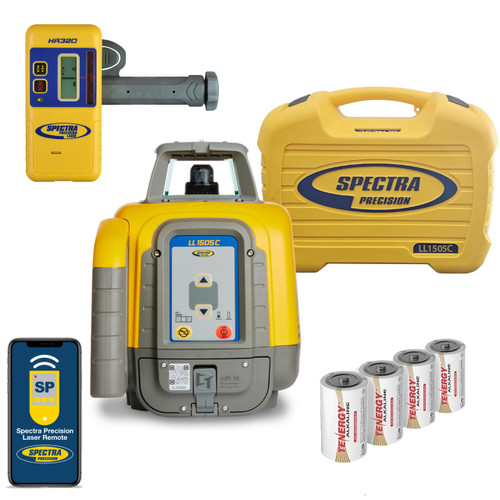
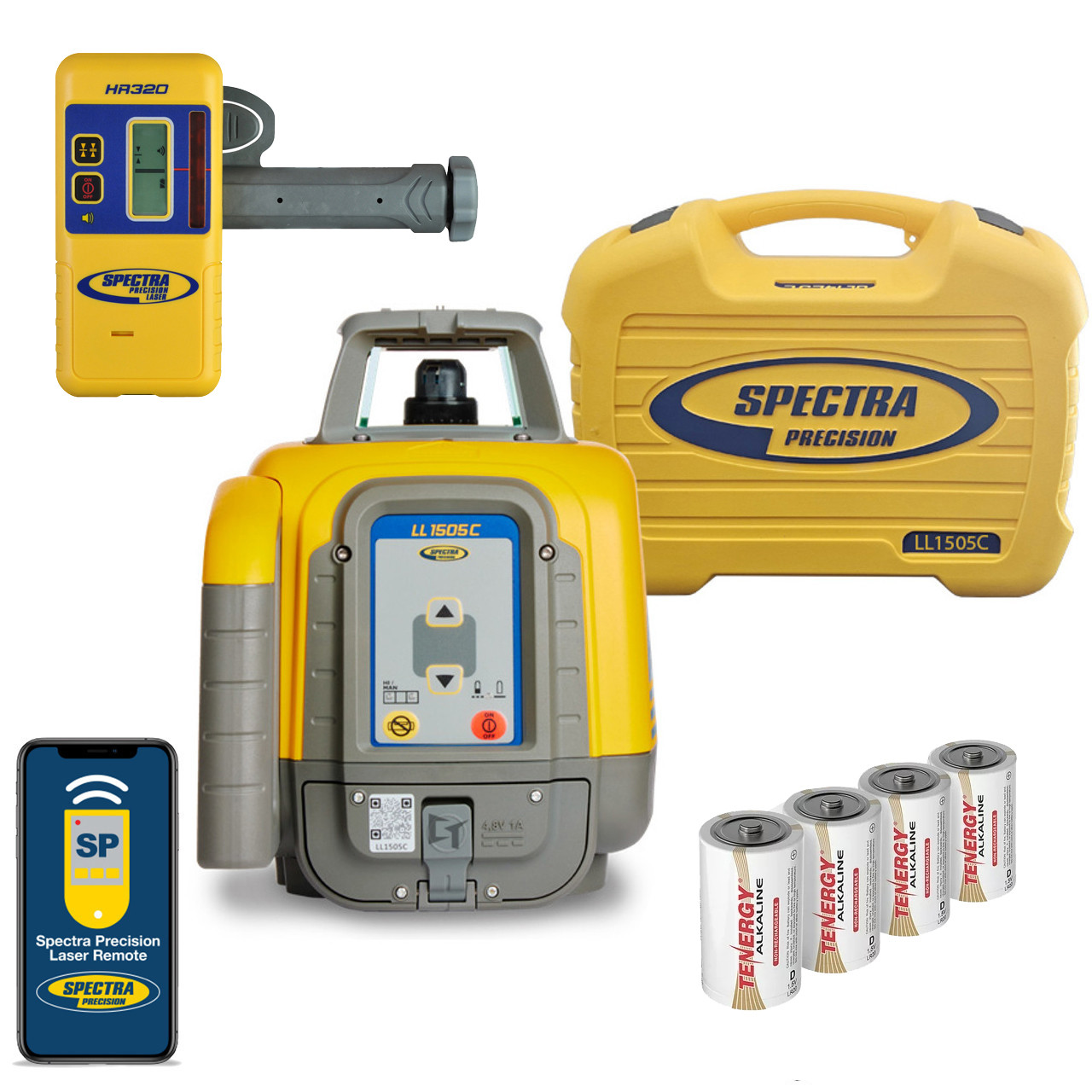
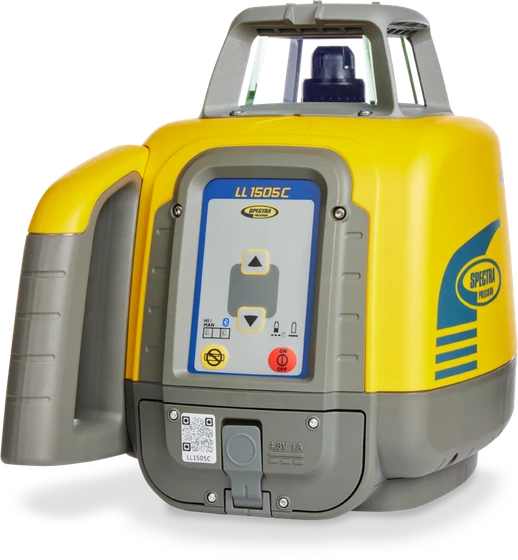
Everything for the job in one box: the LL1505C self-leveling laser, the
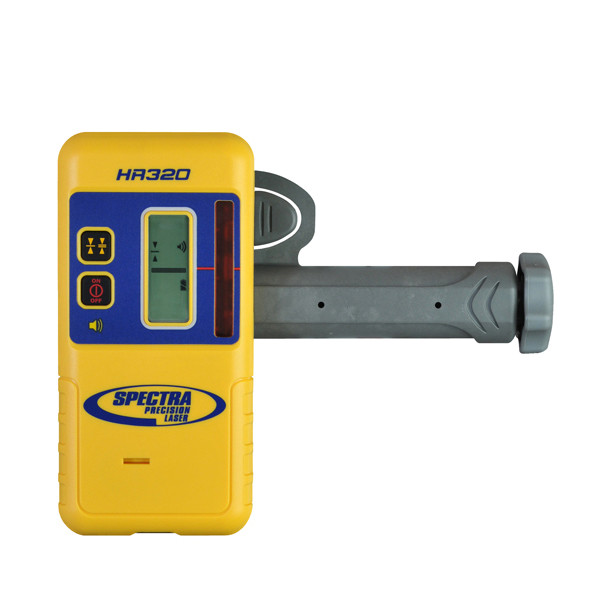
HR320 arrow receiver with its C59 clamp, four D-cell alkaline batteries — and the 128994-00 small case that keeps the
laser, receiver and charger protected. Accurate to 1/16″ at 100 ft across a 4,000 ft working diameter,
with Bluetooth so your phone sets the slope.
Questions? Talk to someone who uses these: 1-877-866-5721
±1/16″
At 100 ft
4,000 ft
Working diameter
IP66
Dust & jet rated
4 x D-cell
Batteries included
300/600/900
Rotation rpm
±5°
Self-leveling
5 years
Warranty
Small case
Laser and receiver only
Pour concrete with confidence
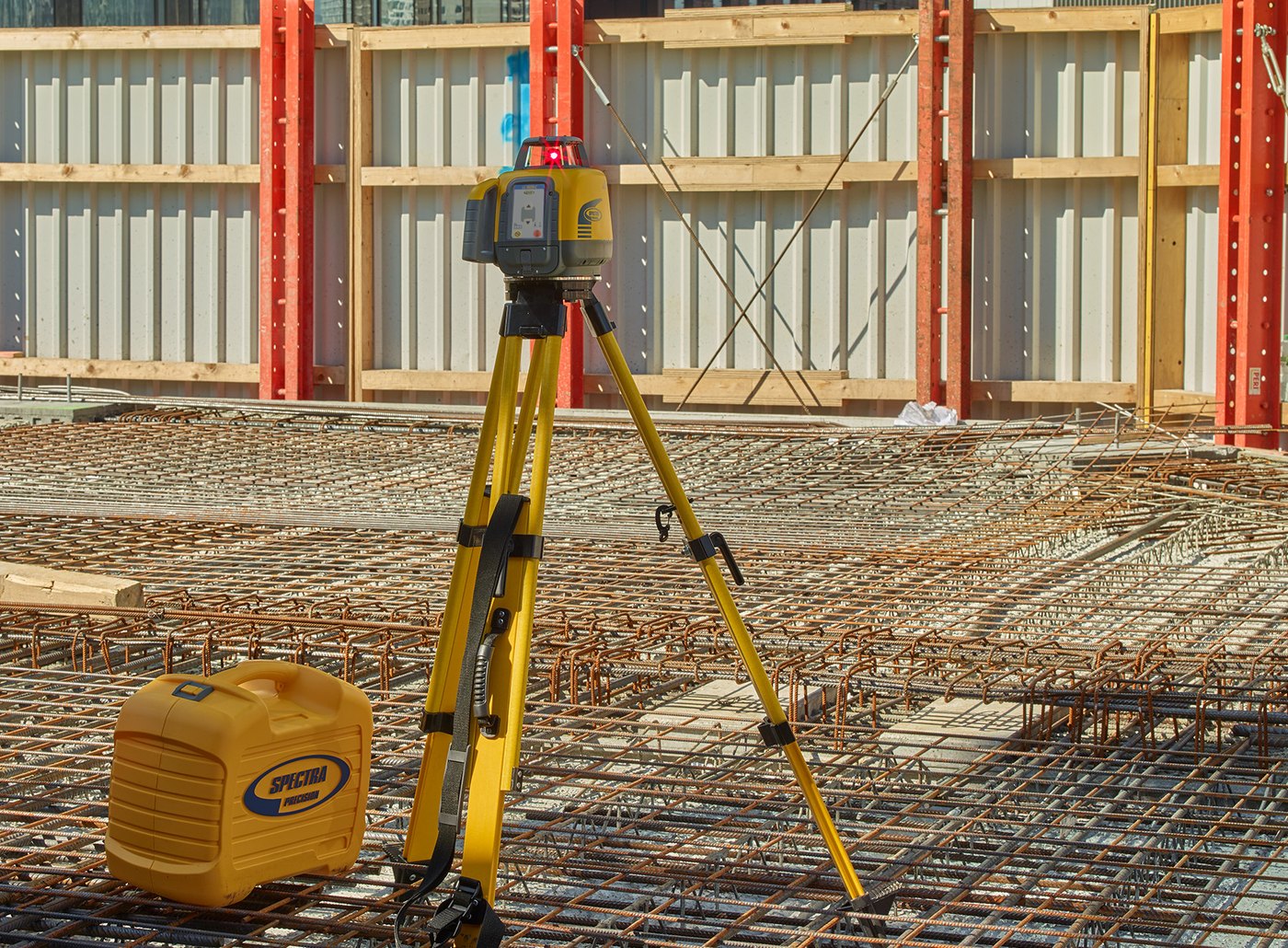
Forms, footings and screed line all off one plane. Set it in the morning and it holds all day.
Get the grade right the first time
Cut and fill read straight off the rod, so nothing gets set on somebody’s guess.
Move dirt with fewer grade checks
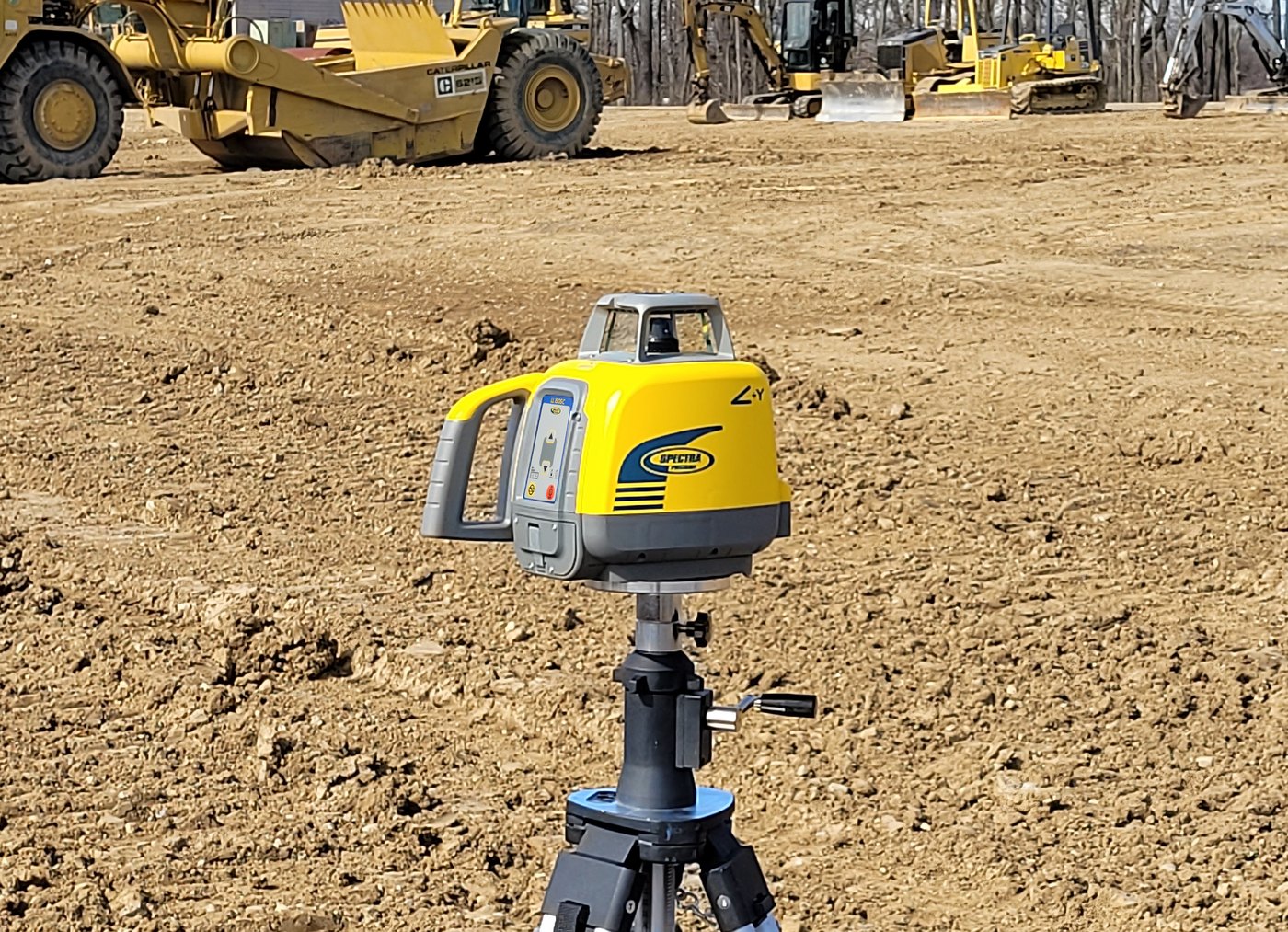
A 4,000 ft working diameter — check from where you are standing instead of walking back to the hub.
The pairing
The laser makes the plane. The HR320 reads it.
LL1505C
It puts the plane up.
Self-levels every time it powers on, so you can never arrive on site working off yesterday’s slope by accident.
1/16″ at 100 ft. 300 / 600 / 900 rpm, and a ±5° self-leveling range.
Manual slope on X and Y, with the direction of each axis cast into the housing.
Bluetooth is built in. Your own phone sets the slope — there is no remote you have to buy first.
A 3 ft drop onto concrete and a 5 ft tripod tip-over, sealed to IP66.
HI alert watches the height of instrument. Knock the tripod and the laser stops and tells you, rather than letting you work off a benchmark that moved.
Mask Mode shuts the beam off in up to three windows, so it does not trip another crew’s receiver on a shared site.
HR320
It tells you the number.
A 5″ detection window with 4″ of numeric readout — the receiver hands you a measurement, not a beep you have to interpret.
Displays in mm, cm, inches or fractional inches.
Five working accuracy settings, Ultra Fine at about 1/32″ down to Coarse at about 1/2″: fine grade and rough dirt off the same receiver.
Ships with its C70 clamp, so it goes straight on the rod.
Two-way radio back to the laser. The receiver does not just listen for the beam — it talks to the laser, which is what makes PlaneMatch possible.
What the pair does — and the one thing it does not
Range is set by the laser, not the receiver — the LL1505C works across a 4,000 ft diameter and the receiver on the rod reads it out there the same as anything else would. What the receiver decides is what you see: the HR320 gives you a five-segment grade arrow on a front and rear LCD, and a beeper you can hear over a machine, instead of a number to read.
The one thing it will not do is PlaneMatch. That needs two-way radio between laser and receiver, and the HR320 has no radio. The laser is capable of it, so adding an HL760 or a CR700 later switches it on without replacing anything else.
That pairing is already done for you in the LL1505C-8 — laser, receiver and its clamp come out of the same case.
What you get
The whole job in one case
Laser and receiver
The LL1505C self-leveling laser and the HR320 arrow receiver with its C59 clamp — the receiver that tells you high, low or on grade, loud enough to hear over a machine.
Receiver and power
Four D-cell alkaline batteries in the box. Add a rod and a tripod, or use the ones you already own.
The 128994-00 small case
The laser, the receiver and the receiver travel in the molded case — less case to carry, less to pay for.
Smaller case, lighter load, less to pay for.
The technical edge
288 acres from one setup
Reach
A 4,000 ft working diameter — a circle three quarters of a mile across. Set it once and cover ground that would otherwise cost you three or four moves.
Precision
1/16″ at 100 ft from the laser, and the HR320 reads to 1/16″ on its Fine setting. Tight enough for forms, footers and finish concrete.
Speed
300 / 600 / 900 rpm. The beam only tells a receiver where it is when it sweeps past — 15 times a second at 900 rpm instead of 5 at 300. On a moving machine that is the difference between holding grade and chasing it.
Most lasers make you choose between reach and precision. This one does not.
What sets it apart
Two ways to control your laser
1 · Your phone — free
Bluetooth is built in. The Laser Remote App sets slope, changes rotation speed and reaches nearly every setting in the laser. Nothing extra to buy.
2 · The RC1402 remote
Buttons in your hand and 330 ft of radio that behaves the same every day. It is also the only way to reach radio channel and language — and the one that still works when the phone is flat, gloved-out or back in the truck.
Most crews end up using both. Your choice, not ours.
Free Same-Day Shipping · Order by noon central and it ships today. Call 1-877-866-5721 for express and next-day options. · Five year laser warranty
Overview
One Laser. Two Ways to Run It.
The LL1505C is a self-leveling horizontal laser with
manual slope, built for general and concrete construction. Spectra call it the most rugged laser
level they make: it survives a 1 m (3 ft) drop onto concrete and a tripod tip-over from
1.5 m (5 ft), and it is sealed to IP66 against dust and jetted water.
Two things separate it from a basic rotary laser. It is more accurate and
reaches further — 1/16 inch at 100 feet, and the laser itself transmits across a
4,000 ft diameter if you ever put a longer-range receiver on the rod. And it has Bluetooth built in, so the Spectra Precision Laser Remote App on
your own phone sets the slope and drives the laser. Spectra's own words: it
"eliminates the extra cost of the remote control."
The HR320 in this kit is the receiver that gives you a number rather than a beep: a
3 inch readout band, 1.5 in. either side of grade, on a front and rear LCD.
It has no radio, so PlaneMatch is not part of this kit — that needs an HL760 or a CR700.
What’s in the Box
What You Receive.
LL1505C Laser
Self-leveling rotary laser with manual slope and Bluetooth. 1/16 in at 100 ft, 300/600/900 rpm, IP66, five year warranty.
HR320 Laser Receiver
Arrows and a beeper, not a number. 2 in (50 mm) capture height, 90° acceptance angle, a five-segment grade arrow on the front and rear LCD, two on-grade sensitivities (fine 1/16 in, coarse 1/4 in) and a 100+ dBA beeper you can hear next to a running machine.
C59 Rod Clamp
The rod clamp that ships with the HR320 — it is part of the receiver, not a separate purchase.
4 D-Cell Alkaline Batteries
Buy them anywhere, swap them on the tailgate, and there is nothing to leave on a charger the night before. Spectra do not publish an alkaline runtime — it depends on the brand of cell.
128994-00 Small Carrying Case
The factory molded case for the laser, the receiver and the charger — the three things worth protecting. Small enough to live behind the seat.
Laser Remote App
iOS and Android, free. Bluetooth control of slope, rotation speed and the laser functions from your own phone.
Quick Guide, Safety Instructions and 5-Year Warranty
Multi-language documentation in the box. The laser carries Spectra’s five year no-cost warranty — if it fails inside five years it is repaired free, parts and labor.
LL1505C-8
Know exactly what you are buying
There is no rod and no tripod in this kit.
That is deliberate, and it is the whole reason this one is the cheapest way into an LL1505C. You get the LL1505C laser, the HR320 receiver with its C59 clamp, four D-cell alkaline batteries and the 128994-00 molded case. Nothing else.
Buy it if you already own a rod and a tripod. Most crews do, and there is no sense paying again for a second set that rides in the same truck. If you would rather choose your own, every rod and tripod we stock is listed further down this page and they all fit this laser.
If you want the whole outfit under one part number — laser, receiver, rod, tripod and case together — that is the LL1505C-82 in inches, or the LL1505C-81 in tenths. Same laser, same HR320.
This kit runs on alkalines. Want the rechargeable pack instead?
The LL1505C-X2 is this exact kit — same laser, same receiver and clamps, same rod, tripod and case — with the B10 10,000 mAh NiMH pack and the CH10 charger in place of the four D-cells. Up to 55 hours a charge and nothing to keep buying. Alkalines are the cheaper way in; the pack is the cheaper way to run it.
Cut and fill, building pads, sub-base and sub-grade elevations
Drainage & Pipe Laying
Storm drains, septic fields, footers and trench depth
Forms & Footers
Leveling and aligning forms and footers to a single reference
Driveways & Ramps
Basic slopes — the single axis slope mode is built for exactly this
Estimating Cut and Fill
Read the number off the rod and work the quantity before you move dirt
Concrete & Slab Work
General elevation control across small to medium job sites
Applications as Spectra list them on the
LL1505C datasheet.
VIDEO
See It On the Job.
Spectra’s own field footage. Pick one and it plays here.
The longest of the four and the one to watch if you are choosing between this and a cheaper laser. Two practical ways the LL1505C stops an unchecked elevation turning into a repour, shown on site rather than argued on a spec sheet.
Concrete work — one instrument holding elevation across forms, footers and rebar.Site grading — a 4,000 ft working diameter, so the machines move and the laser does not.
SLOPE
Slope, Three Ways — and Only One Needs the Remote.
The LL300N does manual slope. The LL1505C does manual slope, single-axis slope with the other axis still self-leveling, and PlaneMatch, which works the grade out for you. They are three different jobs and they are worth keeping straight. Two of the three work with the LL1505C-8 exactly as it ships — PlaneMatch is the exception, because it needs a radio receiver and the HR320 in this kit does not have one.
✚︎
Manual Mode — both axes
Press the manual button once. Self-leveling stops and the arrow keys tilt both axes. For matching an existing non-level surface, a reference hub, or an elevation that was never level to begin with. The MAN indicator flashes red once a second so the laser can never be mistaken for a self-leveling one.
PRESS MANUAL ×1
◢︎
Single Axis Slope — the ramp mode
Press the manual button twice. The Y axis goes to manual and the X axis keeps self-leveling — so your fall runs true down the drive while the laser still holds itself level across it. Red and green flash together, once a second. This is done at the laser. No remote, no phone.
PRESS MANUAL ×2
⇄︎
PlaneMatch — it works the grade out (needs a different receiver)
You do not calculate the fall. Set the receiver on the first point, then the second, and the laser matches the existing grade between them over ground you have not measured. Spectra’s own words: it “eliminates the need for complex calculations and will avoid errors.” Needs an HL760 or CR700 receiver, driven from the free app or the RC1402.
APP OR RC1402 + HL760/CR700
The number almost nobody lists
Slope range: ±9% (5°)
Spectra print this figure in exactly one place — the User Guide troubleshooting table, under error 130, “Check if the receiver was set out of the slope range (+/- 9%, 5°).” It is not on the datasheet and not on Spectra’s website, which is why you will struggle to find it anywhere else. It is the same envelope the compensator uses to self-level (±5°, ±8.7% on the datasheet), but Spectra state it separately for slope, so we list it separately.
THE RECEIVER
Arrows and a Beeper. No Number.
The HR320 is the straightforward receiver. Arrows and a beeper: too high, too low, on grade. Read it off the front or the back, hear it over a machine, snap it off the rod and carry it. That is the whole job, and for a great many jobs it is the whole job you need.
Be clear about what it does not do. It has no numeric readout. When you are off grade it shows you which way, not how far — so you move the receiver, look again, and close in. A digital readout receiver like the HL450 or the HL760 prints the distance and you go straight there. If you are setting one elevation and checking it, the arrows are fine. If you are chasing cut and fill all day, the number earns its money.
The other honest limit is the 2 in. capture height. That is the window that sees the beam at once. A wider window finds the beam faster when you are a long way out or the rod is moving — which is why the bigger receivers quote 4 and 5 inches. At 2 inches you hunt a little more on the first setup and then it makes no difference at all.
HR320
What it means on the rod
Capture height
2 in. (50 mm) — the vertical window that can see the beam at once. Get the receiver anywhere inside it and the arrow points you to grade.
Acceptance angle
90° — it picks the beam up across a wide arc, so it does not have to be squared to the laser to read it.
Display
5-segment grade arrow LCD, on the front and the rear of the receiver. You read it from either side without turning the rod around.
Numeric readout
None. The arrows tell you high, low or on grade. They do not tell you how far off you are — that is what a digital readout receiver is for.
On-grade sensitivity
Two. Fine 2.0 mm (1/16 in.) for forms and finish work, coarse 6.0 mm (1/4 in.) for rough grading. It powers up in fine.
Marking notch
Cut 50 mm (2 in.) below the top of the housing and lined up with the on-grade photocell — mark there and the elevation goes straight onto the stake.
Audio
Two volumes — 100+ dBA to carry over a running machine, 75–85 dBA for close work — or switched off.
Rod clamp
C59 snap-in, included. Snaps on and off, so you go from rod-mounted to handheld without unthreading anything.
Machine mounting
Not machine mountable. This is a rod and hand receiver.
Radio
None. See the note below on PlaneMatch.
Batteries
Two 1.5 V AA (LR6) — alkaline, NiMH or NiCd.
Battery life
70 hours on alkaline at 68 °F.
Auto shut-off
30 minutes after the last beam or button press — a receiver left switched on in the truck still has batteries on Monday.
Weight
12 oz (0.3 kg).
Environmental
Waterproof housing, survives a 5 ft (1.5 m) drop. Operating −4 °F to +140 °F.
Warranty
Three years.
One feature this kit cannot have
PlaneMatch needs a receiver with a radio. The HR320 has none.
PlaneMatch is the feature where the laser hunts until it finds your receiver and matches the grade to it. It works by the receiver answering the laser over radio. The HR320 has no radio, so this is not a setting it is missing — it is physically not possible.
Everything else on this laser still works from your phone: rotation speed, mask mode, HI alert delay, sensitivity, standby, single axis slope and manual slope. PlaneMatch is the one thing the receiver has to be able to answer. If you want it, you want an HL760 or a CR700 kit.
IN THE MANUAL
Six Things in the Owner’s Manual Most Sellers Never Mention.
None of these are on the datasheet. All of them are in the book that comes in the case, and every one of them is a reason this laser is easier to live with than the spec sheet suggests.
◧︎
Mask Mode — shut off part of the beam
Electronically kills the beam in one, two or three of the four quarters. Two uses: you stop blinding the crew working off their own laser next door, and you stop your own beam bouncing off glass or glossy metal back into your receiver as a false reading.
ARROW THEN MANUAL
⏸︎
Standby — a proper lunch break
Beam off and leveling stopped to save the pack, but the HI alert keeps watching and your setup is preserved. It cancels itself if the laser gets re-oriented, so it can never quietly hide a knock while you are away.
HOLD MANUAL 3 SEC
☰︎
Sensitivity — three levels
This does not change how accurately it levels. It changes how much wind and machine vibration the laser tolerates before it cries HI. Set it low-sensitivity beside a running dozer and it stops nuisance alarms without giving up a thing on accuracy. And the naming misleads: Low sensitivity is not less accurate — it is the setting that keeps the HI alert usable in wind.
APP OR RC1402
◉︎
Six radio channels
Channels 0 to 5. If you are on a site with several lasers running, or somewhere with enough radio traffic to upset a link, you move channel instead of fighting it.
RC1402 SETTINGS
⚠︎
HI / shock alert
Rotation stops, the beam goes off, you get an audible warning, the LED flashes every 4 seconds and the remote shows HI. It is the difference between finding out now and finding out after you have poured.
ALWAYS ARMED WHEN LEVEL
ℹ︎
The Info screen
Hold E on the RC1402 and the laser reports model, battery, internal temperature, three firmware revisions, internal serial number and total runtime hours. Worth knowing before a warranty or service conversation. The free app shows all of it too — and runtime hours are worth asking for before you buy a used laser, because it is the one number that cannot be polished.
APP OR RC1402
Worth Knowing
Before It Comes Out of the Case.
Worth knowing before it comes out of the case
It always wakes up level
Whatever you left it in last night, the LL1505C
powers on in automatic self-leveling every time. You cannot arrive on site working off yesterday’s
slope by accident — and masking clears at power-on too.
It works stood on its side
The mount is 5/8 × 11 both ways up, so the
same laser does plumb, walls and layout. Stood vertical it runs in manual — it cannot self-level on
its side — so the arrow keys drive it directly: up and down sets the vertical slope, left and right
walks the line sideways across the wall.
The casting shows you which way each axis runs
There are slope indication marks moulded into the
housing marking positive Y and positive X. They tell you the direction a Y adjustment will
tilt the beam, and the same for X — so you can line the laser up with your fall
before you touch a button, instead of finding out you have sloped across the drive rather than
along it.
SPECIFICATIONS
Every Number, From Spectra’s Own Documents.
Taken from the LL1505C datasheet and the LL1505C User Guide. Where a figure appears in only one of them, we say so rather than round it off.
►︎ ACCURACY & RANGE
Accuracy
±1.5 mm / 30 m — 1/16 inch at 100 ft — 10 arc seconds
Operational diameter
4,000 ft (1,200 m). This is a property of the laser, not of the receiver on the rod
Self-leveling range
±5° (±8.7%)
Slope range
±9% (5°) — single axis or manual
Rotation speed
300 / 600 / 900 rpm, selectable — set from the RC1402
Laser
630–643 nm, Class 2
►︎ CONTROL
Bluetooth
Built in — free Spectra Precision Laser Remote App, iOS and Android
Radio range
Up to 100 m (330 ft) — the RC1402 / HL760 radio, not Bluetooth. Not used by this kit: the HR320 has no radio, which is what PlaneMatch needs
PlaneMatch distance
Typically 80 m (260 ft) — needs an HL760 or CR700, so not available with the HR320 in this kit
Radio channels
Six (0–5)
►︎ POWER
Power source
4 × D-cell alkaline (included). The B10 NiMH pack and CH10 charger fit this laser and are sold separately
Battery life
55 hours typical with the B10 NiMH pack. Spectra publish no alkaline figure — it depends on the brand of cell
Charge time
Under 10 hours — charges inside or outside the laser
Charger
Not included — this kit runs on alkalines. The CH10 is sold separately if you add a B10 pack
►︎ BUILT TO BE DROPPED
Drop rating
1 m (3 ft) onto concrete
Tripod tip-over
1.5 m (5 ft)
Environmental rating
IP66 — dust tight, protected against jetted water
Operating temperature
-4°F to 122°F
Storage temperature
-13°F to 158°F
Out-of-level warning
Rotor stops and the red HI/MAN LED flashes
►︎ PHYSICAL
Weight
7.7 lb (3.49 kg) including the battery
Dimensions
10.7 × 7.7 × 7.9 in
Mount
5/8 × 11 horizontally and vertically
Warranty
5 years — no cost, parts and labor
The slope range figure is published only in the User Guide troubleshooting table (error 130). It is not on the datasheet.
Compare the Series
Which LL1505C Do You Need?
Every LL1505C package we build, in one place. They all use the same laser — what changes is the receiver, whether a rod and tripod come with it, and which case it lives in. Find the row that matches how you work.
Prices are live from each product page. TENTHS reads in tenths of a foot; INCHES reads in feet and inches. Receiver tiers: HR320 good, HR320 better, CR700 and HL760 best — the HL760 and CR700 are the two that unlock PlaneMatch.
Read This First
Two Things Worth Knowing.
Two ways to control it — and one limit on both.
The free Laser Remote App runs this laser over Bluetooth —
slope, rotation speed, sensitivity, the HI alert, even field calibration. We
connected a phone and checked every screen. Two things it cannot reach: radio channel and
language. Those are
RC1402
only — and so is a radio that reaches 330 ft and behaves the same every day,
where Spectra put the app at 150 ft for setting slope — a good day, not a guarantee, because Bluetooth moves with the weather, whatever is in the way, and the handset in your hand.
Connecting has one trick worth knowing before you are standing in
a field wondering why it will not pair: the laser only listens for a phone during the first
30 seconds after power-on. Miss that window and you cycle the power — nothing is broken.
First run also wants the license accepted and GPS switched on at the phone. Once it is
talking, the status light on the laser turns blue.
Manual slope, not automatic grade entry.
You tilt the beam and verify it on the rod — there is no field
to type "1.5%" into. The app will show you a slope percentage on its first screen and it will not
let you set one: tap it and the laser answers "This functionality is not supported by the
Laser." That readout is there because one app runs Spectra's whole range.
What you do instead: Single Axis Slope, on the laser itself — press the manual button
twice and the Y axis tilts while X keeps self-leveling. If you need to dial an exact
percentage and have the laser hold it, you want an automatic slope laser. Call
1-877-866-5721 and we will point you at the right one rather than let you buy twice.
BLUETOOTH CONTROL
You Cannot Type a Grade Into This Laser.
The LL1505C has Bluetooth built in and a free app — the Spectra Precision Laser Remote, on iOS and Android. It does more than most people expect. But there is one thing it does not do, and it is the reason our phone rings, so we are going to lead with it rather than bury it.
Read this before you order
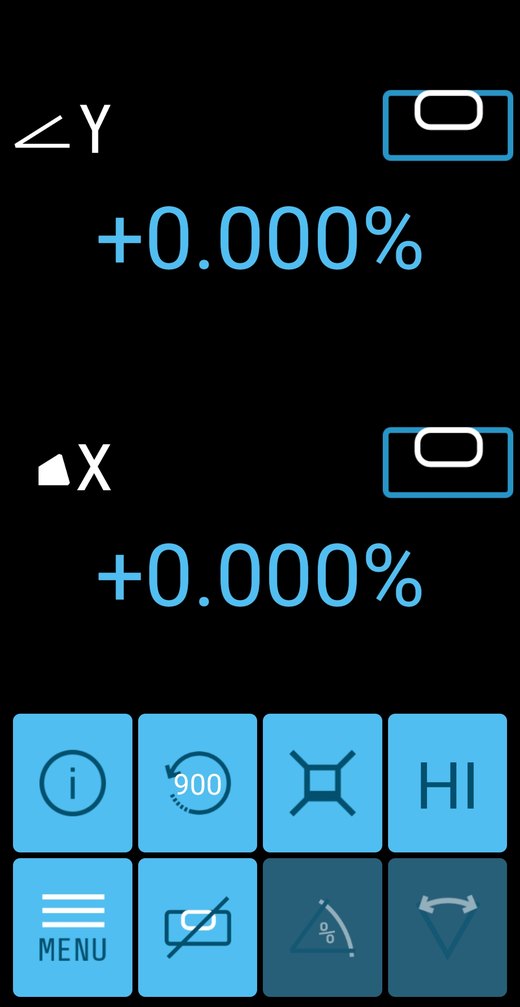
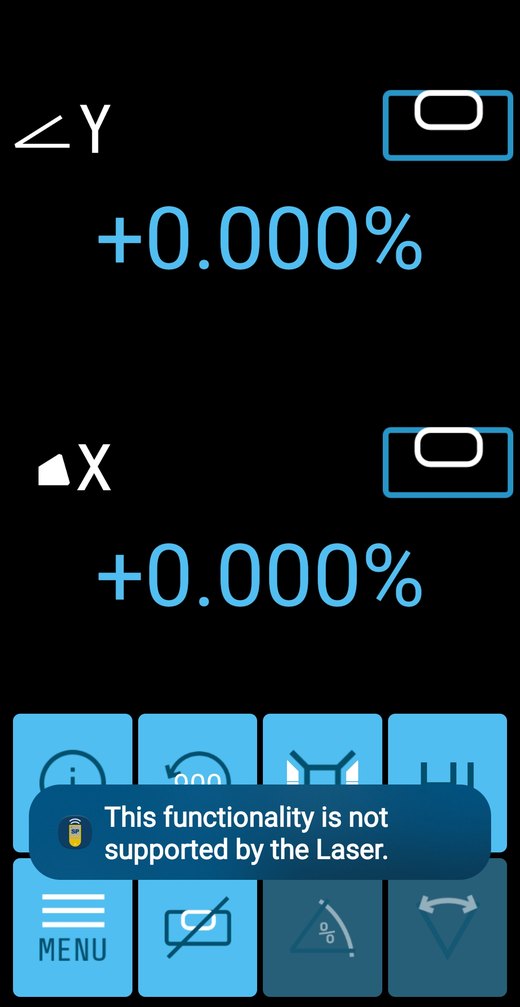
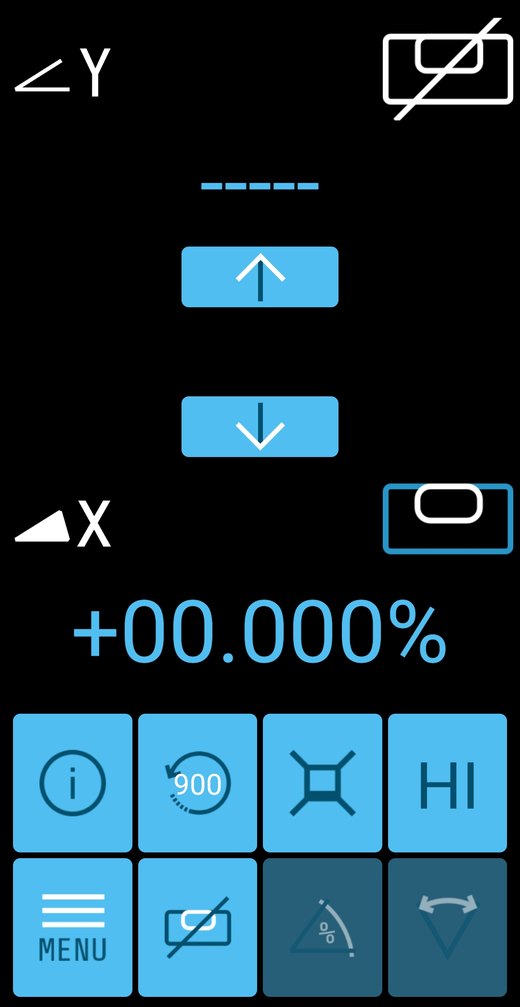
The app opens on a screen showing a slope percentage — ∠Y +0.000% and ◢X +0.000%. People quite reasonably try to type a grade into it. You cannot. The LL1505C is a manual slope laser and it does not accept a typed percentage.
Look at the bottom row of the first screen: the % tile is grayed out. That is Spectra’s own app telling you. Tap it anyway and the laser answers “This functionality is not supported by the Laser.”
It is there because one app runs Spectra’s whole laser range, and the models above this one do take a typed grade. This one does not.
What to do instead: use Single Axis Slope and tilt with the arrows, checking it on the rod — or let PlaneMatch work the grade out for you with an HL760 or CR700.
If you genuinely need to dial in 1.5% and have the laser hold it, you want an automatic slope laser — not this one. Call us on 1-877-866-5721 before you order, not after.
The screen the app opens on. Note the grayed-out % tile, bottom row.Tap it and the laser tells you plainly.
Now the good part — what it actually does.
Spectra’s datasheet says the Bluetooth “eliminates the extra cost of the remote control.” On this laser that is very nearly true, and we checked every screen to be sure.
No phone, no remote
At the Laser Itself
Power on — always starts in automatic self-leveling
Manual mode, both axes — manual button ×1
Single Axis Slope — manual button ×2. The ramp mode needs nothing else at all.
Mask Mode and Standby
If sloping a drive is what you came for, the laser already does it on its own.
The free app does all of this
App or RC1402
PlaneMatch — with an HL760 or CR700
Rotation speed — 300 / 600 / 900 rpm
Setting manual slope on your own — Spectra put the app at 150 ft for this
HI alert delay, sensitivity, mask, standby, all three slope modes
Field calibration of the X and Y level sensors
Runtime hours, serial number, firmware, internal temperature
Share Logs — email the laser’s own fault log to us
Spectra’s printed manual says several of these need the remote. They do not — the app has moved on since the book was written.
What the app cannot reach
The RC1402 Only
Radio channel — for sites running several lasers
Language — 14 of them: English, German, Italian, French, Spanish, Portuguese, Dutch, Danish, Norwegian, Swedish, Finnish, Polish, Turkish and Czech
330 ft of radio that behaves the same every day — more than twice the app
Working when the phone is flat, gloved-out or back in the truck
A shorter list than Spectra implies. We would rather you bought one for the right reason than returned it for the wrong one.
Single Axis Slope: Y under your arrows, X still self-leveling.
This is the mode you want for a drive or a ramp. Hold the arrow and the beam walks up or down on Y — and X never stops self-leveling. While you set your fall, the laser is still watching your cross-axis and still protecting it.
Compare that with full manual mode, where Spectra’s own warning reads: “the laser is not self-leveled… there is no control for the slope accuracy and no warning for the Height of the Instrument (HI-alert).”
Every axis you take manual control of, you also take responsibility for. In single axis you hand over one and keep the guard on the other. In manual you hand over both, and nothing tells you if the tripod gets bumped — not the beam, not the alert, not the receiver. You find out when the concrete is wrong.
The whole app, screen by screen
We connected a phone to an LL1505C and photographed every screen in the app — every menu, every setting, what each one does on this laser and which ones do nothing. Read the full LL1505C app guide → Documented against Laser Remote app version 2.1.14, September 2026. Spectra update the app; if you spot a difference, tell us and we will correct this page.
LED REFERENCE
Reading the Lights.
These are the laser’s own panel indicators, written the way Spectra document them. Match what you see to the row and you know the state of the machine without walking over to it.
Indicator
What it means
Green, flashing 1/sec
Self-leveling is running. Give it a moment.
Green, solid
Level and inside accuracy. Solid for the first 5 minutes after leveling.
Green, flash every 4 sec
Level and HI alert armed. This is the state you want to see all day.
Red, flashing 1/sec
Manual mode. The laser is not self-leveling — both axes are under your arrows.
Red and green together, 1/sec
Single Axis Slope. Y is under your control, X is still self-leveling.
Red every 5 sec
Standby. Beam off to save battery, setup preserved, HI still watching.
Red, flashing with a tone
HI / shock alert. Something moved the laser — a bumped leg, a sinking tripod foot. Rotation stops and the beam goes off on purpose. Re-level and check your benchmark before you trust another reading.
Blue
A phone is connected over Bluetooth.
QUICK REFERENCE
Every Button, and What It Does.
You do not need this to buy the laser. You will want it the first week you own one, standing over the thing trying to remember how to get back out of manual mode. Print it, or keep this page bookmarked on your phone.
Everything here is done at the laser itself unless the row says otherwise — and the two rows that mention the RC1402 can also be done from the free app. The full manual is in the downloads below, and it is built into the app as well.
What you press
What the laser does
Hold power 2 seconds
All LEDs light for 2 seconds. The laser always starts in automatic self-leveling — you cannot leave it in slope by accident overnight.
While self-leveling
Status LED flashes once a second.
Once it is level
Solid for 5 minutes, then a flash every 4 seconds — that slow flash means level and HI alert armed.
Manual button ×1
Manual mode. MAN flashes red 1/sec. Arrows tilt both axes.
Manual button ×2
Single Axis Slope. Red and green flash together 1/sec. Up/down slopes Y; X keeps self-leveling.
Manual button ×3
Back to automatic self-leveling.
Hold manual 3 seconds
Standby. Beam off, leveling stopped, batteries saved — but the HI alert stays live and your setup is kept. Hold 3 seconds again to come back.
Arrow, then manual within 1 second
Masks that quarter of the beam. Masking always clears at power-on — yesterday’s mask never follows you to today’s job.
M → Rotation → 300/600/900 → E
Rotation speed. The guide names the app or the RC1402 for this. Factory setting is 900 rpm, and it restarts on the last speed used.
M → PlaneMatch → E → E
Runs PlaneMatch; ends in Single Axis Slope. Exit with manual ×2. Needs an HL760 or CR700 — not the HR320 in this kit.The app does this too.
Hold E on the RC1402
Info screen: rotation speed, internal temperature, battery, firmware and total laser runtime hours.
QUESTIONS & ANSWERS
LL1505C Questions We Actually Get.
Grouped so you can find yours. Buying questions first, then how to work it, then what to do when something is wrong.
Before You Buy 10
Does the LL1505C-8 kit come with a grade rod or a tripod?
No, and that is exactly what makes it the cheapest way into an LL1505C. This kit is the laser, the HR320 receiver with its C59 rod clamp, four D-cell alkaline batteries and the 128994-00 molded carrying case. It is built for the crew that already owns a rod and a tripod and does not want to pay for a second set. If you do need them, every rod and tripod we stock is listed on this page and any of them will work. Or take the LL1505C-82 in inches or the LL1505C-81 in tenths, which are this same kit with the rod and the ALQR20 tripod already in the box.
How much slope can the LL1505C actually do?
Plus or minus 9 percent, which is 5 degrees. Spectra publish that figure in one place only, the User Guide troubleshooting table under error 130, so you will struggle to find it anywhere else. It is the same envelope the compensator uses to self-level, but Spectra state it separately for slope so we list it separately.
Can I type in a slope percentage such as 1.5 percent?
No. The LL1505C is a manual slope laser. You tilt the axis with the arrow keys and verify the fall on the rod. If you need to dial an exact percentage into the laser, you want an automatic slope laser. Call 1-877-866-5721 and we will point you at the right one rather than let you buy twice.
Do I need the RC1402 remote, or is the phone app enough?
The free app does more than most people expect. The User Guide names the app alongside the remote for rotation speed, so do not let anyone sell you an RC1402 for that. What the app cannot reach is the Settings menu, which holds sensitivity, radio channel, backlight and language, and the Info screen with internal temperature, firmware and total runtime hours. The remote also gives you a 330 ft radio link that behaves the same every day. Spectra publish 150 feet for setting manual slope from the app on this laser, and that is the figure we quote, but treat it as a good day rather than a guarantee: Bluetooth range moves with the weather, with whatever is standing between you and the laser, and with the phone in your hand. Our advice is to get the app on day one and add the remote when you want the settings, the diagnostics, or a link that does not care what phone you carry.
How far will the LL1505C-8 reach?
A 1,200 meter working diameter, which is 4,000 feet. That is a property of the laser and not of the receiver on the rod, so it is the same figure whichever receiver you put in front of it. It is roughly two and a half times the working diameter of the LL300N series. What the receiver changes is what you see when the beam arrives: the HR320 in this kit gives you a grade arrow and a tone, readable from the front or the back. It shows you which way to move, not how far.
Does the LL1505C-8 do PlaneMatch?
No, and it is worth knowing before you buy. PlaneMatch makes the laser match a grade that already exists: you set the receiver on your first point and then your second, and the laser works out the fall between them over ground you have not measured. It needs two way radio between the laser and the receiver, and the HR320 in this kit has no radio at all. PlaneMatch needs an HL760 or a CR700 receiver plus the RC1402 remote. The laser itself is capable of it, so adding the receiver later turns it on without replacing anything else.
Does the LL1505C kit come with rechargeable batteries?
No, and that is the point of this version. It ships on four D-cell alkaline batteries, which cost less up front. You buy replacements at any hardware store, you swap them on the tailgate, and there is nothing to remember to put on a charger the night before. If you would rather run rechargeable, the B10 10,000 mAh NiMH pack and the CH10 worldwide charger both fit this exact laser and are listed in the parts section below, so you can add them whenever you want without changing lasers.
Can the LL1505C be used vertically?
Yes. It mounts 5/8 by 11 horizontally and vertically. In vertical setup the up and down arrows set vertical slope and the left and right arrows move the line left and right, so it is a genuine second application rather than a footnote.
Is the LL1505C more accurate than the LL300N?
Yes, and by a clear margin. The LL1505C holds 1/16 inch at 100 feet against the LL300N at 3/32 inch, and it works across a 4,000 ft diameter against the LL300N's 1,650 ft. It also gives you three rotation speeds and Bluetooth, neither of which the LL300N has.
How long is the warranty on the LL1505C?
Five years, and it is a no-cost warranty: no charge for parts and no charge for labor. If the laser unit fails inside those five years you send it back and it is repaired free. The HR320 receiver carries its own three year warranty on top of that, under which Spectra repairs or replaces a defective part at its option.
Using Your LL1505C 8
Can I run the LL1505C on alkaline batteries?
Yes, and four D-cell alkalines are in the box as backup. Lift the B10 rechargeable pack out and the D-cells slide straight into the compartment. There is no tray, no adapter and nothing extra to buy. Figure on about 45 hours from a charged NiMH pack and about 90 hours on alkalines. The one thing that will destroy the laser is building alkaline cells into the B10 pack's own housing, because the charger will then try to charge them. Spectra's manual is blunt about it: severe damage to the unit will result if charging is attempted.
How do I set single axis slope without a remote?
Press the manual button twice at the laser. The red and green indicators flash together once a second, the Y axis comes under your arrow keys and the X axis keeps self-leveling. Press manual three times to go back to full automatic. The remote is not needed for this.
Does the HR320 tell me how far off grade I am?
No, and it is the main thing to understand before you buy this kit. The HR320 has a five segment grade arrow on the front and the rear of the receiver, and a loud beeper you can set loud or soft, or switch off. It tells you that you are high, low or on grade and which way to move. It does not print a distance. A digital readout receiver such as the HL450 or the HL760 shows you the actual measurement, so you go straight to grade instead of closing in on it. For setting one elevation and checking it the arrows are quick and simple. If you are chasing cut and fill all day, a readout receiver earns the difference.
What do the laser's lights mean?
Green flashing once a second is self-leveling. Green solid is level, for the first five minutes. Green flashing every four seconds means level and the HI alert is armed, which is the state you want all day. Red flashing once a second is manual mode. Red and green together is single axis slope. Red every five seconds is standby. Blue means a phone is connected over Bluetooth.
What is Mask Mode for?
It electronically shuts the beam off in one, two or three of the four quarters. Two reasons to use it: you stop blinding a crew working off their own laser next door, and you stop your own beam bouncing back off glass or glossy metal into your receiver as a false reading. Masking always clears at power-on, so yesterday's mask never follows you to today's job.
Can I charge the battery pack outside the laser?
Yes. There is a charger jack on the laser itself, and the CH10 charger will also charge the B10 pack out of the unit. That is what lets you run a spare pack and swap it rather than stand and wait.
How do I do the math on a manual slope laser?
It is one multiplication. The drop in inches equals the distance in feet times the slope percentage times 0.12. Over a 100 foot run the numbers come out very tidily, because every 1 percent of fall is 12 inches of drop. Half a percent over 100 feet is a 6 inch drop. One percent is 12 inches. One and a half percent is 18 inches. Two percent is 24 inches. Two and a half percent is 30 inches. Three percent is 36 inches. So you measure your distance along the line of fall, slide the receiver down the rod by that amount, then tilt the beam back into the center of the receiver and the slope is set. Set it over the longest run the job allows, because the same small error over 25 feet is four times worse than it is over 100 feet.
How do I run PlaneMatch?
Not with this kit, because the HR320 has no radio, but the laser itself can do it if you add an HL760 or a CR700. On the RC1402 press M, choose PlaneMatch, then E and E again. The laser and receiver do the work between them and the laser finishes in Single Axis Slope. To come out of it, press the manual button twice.
Troubleshooting 6
My phone will not connect to the laser.
The laser only listens for a phone during the first 30 seconds after power-on. If you missed that window, switch the laser off and on and connect straight away. On a first run the app also wants the license accepted and GPS switched on at the phone. None of that is a fault.
The laser stopped, the beam went off and it is warning me.
That is the HI or shock alert. Something moved the laser, usually a bumped tripod leg or a foot sinking into soft ground. Rotation stops and the beam goes off deliberately so that you cannot keep working off a reference that has shifted. Re-level the laser and check it against your benchmark before you trust another reading.
PlaneMatch failed and the laser is showing error 130.
This one only applies if you have added an HL760 or a CR700, since PlaneMatch does not run on the HR320. Error 130 is a mechanical limit during PlaneMatch. It means the receiver was set outside the slope range, which is plus or minus 9 percent, or 5 degrees. Check the fall between your two points; if it is steeper than 9 percent this laser cannot match it.
The laser will not self-level, or it never finishes leveling.
Check that it is within the self-leveling range of plus or minus 5 degrees to begin with, because a tripod set badly out on a slope will leave it hunting. Also check that it is not in manual mode, where the MAN indicator flashes red once a second and the laser is not trying to level at all. Press the manual button three times to return to full automatic.
My receiver will not pick up the beam even though the head is spinning.
Work through it in this order. Check that you are inside the 4,000 ft working diameter, which is 2,000 ft in any direction from the laser. Check that Mask Mode is not switched on and shutting the beam off in the quarter you are standing in. If you are running a radio receiver such as an HL760, check it is paired and on the same channel, since the LL1505C has six channels from 0 to 5; the HR320 has no radio, so there is nothing to pair.
Two receivers on the same laser give different readings.
Check that both are clamped at the same height on their rods, which is the usual answer. After that, confirm both are reading the beam itself rather than one of them sitting in a masked quarter, and check each rod is plumb, because a leaning rod reads high every time.
STEP BY STEP
How to Set Manual Slope on the LL1505C.
This is the one job people ring us about, so here it is the way we would walk you through it on the phone. The example sets 1% over 100 feet — the most common drive and drainage grade there is — but the method is identical for any slope. Only the number in step 6 changes.
Before you start
You need the laser on a tripod, a grade rod, a receiver, a tape measure, and either the free app or the RC1402. You do not need an automatic slope laser for this — and you do not need to type a percentage anywhere. You are going to set the fall by eye and tape, and the laser will hold it.
1
Set the laser up on the tripod
Solid ground, legs pushed in. This is the one thing you cannot rush — everything after it inherits whatever you do here.
2
Point it in the direction of your slope
The Y axis is the one that tilts. Aim the laser so Y runs down the line of fall — down the drive, down the trench, down the pad. Get this wrong and you will slope across your work instead of along it.
3
Switch it on and let it finish leveling
Do not touch anything yet. Wait until it has levelled and the HI alert has armed — the status light stops sitting solid and starts flashing every four seconds. That flash is your green light. Set slope before it arms and you are working off a reference that was still settling.
4
Measure out your distance in the direction of the slope
Run a tape from the laser along the line of fall. The longer the run you set over, the more accurate the slope — a small error over 100 ft matters far less than the same error over 20 ft. For a 1% slope, measure out 100 ft.
5
Find the level beam at that point
Take the rod and receiver out to your mark. Slide the receiver up or down the rod until the beam reads dead center — on grade. That is your starting height. Leave the rod exactly where it is standing.
6
Drop the receiver by your calculated amount
Loosen the clamp and move the receiver DOWN the rod by the drop from the table below. For 1% over 100 ft, that is 12 inches. Tighten it there. The receiver is now sitting where you want the beam to end up.
7
Tilt the beam down into the receiver
Now go to the app or the RC1402 and put the laser into Single Axis Slope. Hold the down arrow and walk the beam down until it reads center of the receiver again. That is it — the beam has fallen exactly 12 inches over 100 ft, and your slope is set at 1%.
8
Put the receiver back to your starting height
Move the receiver back UP the rod by the same amount you dropped it — 12 inches — so it is at the height you first found in step 5. Tighten it down and leave it there. That is the setting you will work off all day.
9
Work the slope
Now walk the rod anywhere along that line. Whenever the beam reads center in the receiver, the bottom of the rod is on your 1% grade — all the way out to the limit of what the laser and receiver can see. Nothing else to set, nothing else to calculate.
How far to drop the receiver — any slope, any distance
Find your slope down the left, your measured distance across the top. That is how far the receiver moves in step 6.
Slope
25 ft
50 ft
100 ft
150 ft
200 ft
0.5%
1.5 in
3 in
6 in
9 in
12 in
1%
3 in
6 in
12 in
18 in
24 in
1.5%
4.5 in
9 in
18 in
27 in
36 in
2%
6 in
12 in
24 in
36 in
48 in
3%
9 in
18 in
36 in
54 in
72 in
Do it in your head
Drop in inches = distance in feet × slope % × 0.12 100 ft at 1% → 100 × 1 × 0.12 = 12 inches. 150 ft at 2% → 150 × 2 × 0.12 = 36 inches.
Two things that catch people out
1. Nothing is watching the sloped axis. Once Y is tilted, the laser is no longer self-leveling on that axis and no sensor is checking it for drift. Your X axis is still protected and the HI alert is still armed — but if the tripod is bumped, check your benchmark before you trust another reading.
2. Longer is more accurate. Setting a 1% slope over 25 ft means finding a 3 inch drop, and being a quarter inch out there is a much bigger error than being a quarter inch out over 100 ft. Set over the longest run the job allows.
The other job: matching a slope that already exists
Everything above creates a grade of a number you chose. This is the opposite job — you already have two hubs at the right elevations and you want the beam to run the line between them, whatever percentage that happens to be. Spectra call it Manual Grade Match, and you never work out the grade at all.
Manual Grade Match — six steps
1. Set the laser up over the first elevation point and aim it at the second using the sighting guides on top of the sunshade. 2. Check the beam elevation close to the laser. 3. Press the manual mode button twice for Y-axis single slope. The red and green LEDs flash together, once a second. 4. Stand the rod, receiver already clamped on it, on the second hub. 5. Drive the beam up or down with the arrow buttons — on the keypad, the RC1402N remote or your phone — until the receiver reads on grade. 6. That is the slope. Walk it and check elevations anywhere along the line.
The one that ruins it
Do not change the receiver position on the rod. Not between step 2 and step 5, not to “get a better reading”. The whole method works because the receiver is the same height at both hubs — slide the clamp and you have matched nothing. Your X axis keeps self-leveling the whole time, so the cross slope stays flat while Y holds the fall.
Not sure on any of it? Call 1-877-866-5721 and we will walk you through it with the laser in front of you.
PARTS & ACCESSORIES
Buy the Piece, Not Another Kit.
Every part of every LL1505C kit, sold on its own. If you are one piece short, buy the piece — do not buy another kit.
Buy it for radio channel and language, for 330 ft of radio that behaves the same every day, and for the days the phone is flat or in the truck. Not for rotation speed — the free app does that too.
The step up from the HR320 in this kit: a 5 in window, five precision settings, and the two-way radio that turns on PlaneMatch and takes the laser out to a 4,000 ft diameter.
Rod or machine mounted. Also does PlaneMatch. Takes the C71 magnetic mount for a cab.
Prices are live from each product page. Not sure which rod or which case you need? The chart below lists what ships in every kit — or call 1-877-866-5721 and we will tell you.
DOWNLOADS
Manuals and Documentation.
All six, hosted on our own site so the links do not rot — and two of them in Spanish.
Most owners never find this. The book that lives in the case — or gets lost out of it — is on your phone at four in the afternoon when you are trying to remember what a flashing red light means. Spectra Precision Laser Remote, free on iOS and Android, no laser required to read it.
REVIEWS
What Buyers Say.
5.0
★★★★★
3 verified reviews
Same LL1505C laser in all 3
★★★★★
Great Tool
“Great tool solid & does everything I need and will be adding an equipment receiver as well. The customer service from contractors -tools.com is amazing.”
Verified buyer · LL1505C-82A · Jan 2026
★★★★★
“Spectra Precision hats off great product , love the case for protection and ease of carrying …. Contractor-Tools.Com Kevin knows his products very helpful…..this sells exactly why I bought !!!! Thank you”
Verified buyer · LL1505C-X27 · Apr 2025
★★★★★
Well constructed componets, case is very well organized and easy to use. Laser works well and is user friendly
“easy to set up and use.”
Verified buyer · LL1505C-X26 · Apr 2025
Each one was left on the LL1505C kit that buyer actually bought. The laser is identical in every kit — what changes is the receiver, the rod and the case. Printed word for word, nothing tidied up. Questions first? Call 1-877-866-5721.
Questions about the LL1505C? Talk to someone who uses these.